
reality 节点搭建

vless-reality 节点搭建

准备一个VPS

选择一家VPS厂商,获取一台VPS

节点搭建

查看操作系统和cpu架构

1
uname -a

Linux ser6.1.0-32-cloud-amd64 #1 SMP PREEMPT_DYNAMIC Debian 6.1.129-1 (2025-03-06) x86_64 Linux

1
cat /etc/os-release

NAME=“Alpine Linux” ID=alpine VERSION_ID=3.20.6 PRETTY_NAME=“Alpine Linux v3.20” HOME_URL=“https://alpinelinux.org/” BUG_REPORT_URL=“https://gitlab.alpinelinux.org/alpine/aports/-/issues”

从上面打印信息, 可以知道当前是Linux操作系统,cpu为amd64架构,到Xray下载适配当前操作系统架构的xray-core版本

1
wget https://github.com/XTLS/Xray-core/releases/download/v25.6.8/Xray-linux-64.zip

解压并进入解压后的目录

1
unzip Xray-linux-64.zip -d xray && cd $_

节点配置

创建一个json文件(xray内核config.json),内容如下:

1
2
3
4
5
6
7
8
9
10
11
12
13
14
15
16
17
18
19
20
21
22
23
24
25
26
27
28
29
30
31
32
33
34
35
36
37
38
39
40
41
42
43
44
45
46
47
48
49
50
51
52
53
54
55
56
57
58
59
60
61
62
63
64
65
66
67
68
69
70
71
72
73
74
75
76
{
"log": {
"loglevel": "warning"
},
"routing": {
"domainStrategy": "IPIfNonMatch",
"rules": [
{
"type": "field",
"port": "443",
"network": "udp",
"outboundTag": "block"
},
{
"type": "field",
"ip": [
"geoip:cn",
"geoip:private"
],
"outboundTag": "block"
}
]
},
"inbounds": [
{
"listen": "0.0.0.0",
"port": 15892,// 随便填写
"protocol": "vless",
"settings": {
"clients": [
{
"id": "",// 必填,执行 ./xray uuid 生成,或 1-30 字节的字符串
"flow": "xtls-rprx-vision"// 选填,若有,客户端必须启用 XTLS
}
],
"decryption": "none"
},
"streamSettings": {
"network": "tcp",
"security": "reality",
"realitySettings": {
"show": false, // 选填,若为 true,输出调试信息
"target": "workflexnation.com:443",// 必填,格式同 VLESS fallbacks 的 dest
"xver": 0,// 选填,格式同 VLESS fallbacks 的 xver
"serverNames": [// 必填,客户端可用的 serverName 列表,暂不支持 * 通配符
"workflexnation.com",
"evonet.io"
],
"privateKey": "",// 必填,执行 ./xray x25519 生成
"shortIds": [// 必填,客户端可用的 shortId 列表,可用于区分不同的客户端
"", // 若有此项,客户端 shortId 可为空
"0123456789abcdef" // 0 到 f,长度为 2 的倍数,长度上限为 16
]
}
}
}
],
"outbounds": [
{
"protocol": "freedom",
"tag": "direct"
},
{
"protocol": "blackhole",
"tag": "block"
}
],
"policy": {
"levels": {
"0": {
"handshake": 2,
"connIdle": 120
}
}
}
}

sing-box的reality json配置

1
2
3
4
5
6
7
8
9
10
11
12
13
14
15
16
17
18
19
20
21
22
23
24
25
26
27
28
29
30
31
32
33
34
35
36
37
38
39
40
41
42
43
44
45
46
47
48
49
50
51
52
53
54
55
56
57
58
59
60
61
62
63
64
65
66
67
68
69
70
71
72
73
74
75
76
77
78
79
80
81
82
83
84
85
86
87
88
89
90
91
92
93
94
95
96
97
98
99
100
101
102
103
104
105
106
107
108
109
110
111
112
113
114
115
116
117
118
119
120
121
122
123
124
125
126
127
128
129
130
131
132
133
134
135
136
137
138
139
140
141
142
143
144
145
146
147
148
149
150
151
152
153
154
155
156
157
158
159
160
161
162
163
164
165
166
167
168
169
170
171
172
173
174
175
176
177
178
179
180
181
182
183
184
185
{
"log": {
"disabled": true,
"level": "info",
"timestamp": true
},
"dns": {
"servers": [
{
"tag": "google",
"address": "tls://8.8.8.8",
"strategy": "ipv4_only",
"detour": "direct"
}
],
"rules": [
{
"rule_set": [
"geosite-openai"
],
"server": "wireguard"
},
{
"rule_set": [
"geosite-netflix"
],
"server": "wireguard"
},
{
"rule_set": [
"geosite-category-ads-all"
],
"server": "block"
}
],
"final": "google",
"strategy": "",
"disable_cache": false,
"disable_expire": false
},
"inbounds": [
{
"tag": "vless-reality-vesion",
"type": "vless",
"listen": "::",
"listen_port": 443,
"sniff": true,
"sniff_override_destination": true,
"domain_strategy": "ipv4_only",
"users": [
{
"uuid": "",//sing-box generate uuid
"flow": "xtls-rprx-vision"
}
],
"tls": {
"enabled": true,
"server_name": "www.premiumarena.pl",
"reality": {
"enabled": true,
"handshake": {
"server": "www.premiumarena.pl",
"server_port": 443
},
"private_key": "", //sing-box generate reality-keypair
"short_id": [
""// 0 到 f,长度为 2 的倍数,长度上限为 16
]
}
}
},
{
"type": "hysteria2",
"listen": "::",
"listen_port": 433,
"users": [
{
"password": ""
}
],
"masquerade": "https://www.bing.com",
"ignore_client_bandwidth": false,
"tls": {
"enabled": true,
"alpn": [
"h3"
],
"certificate_path": "cert.pem",
"key_path": "private.key"
}
}
],
"outbounds": [
{
"type": "direct",
"tag": "direct"
},
{
"type": "block",
"tag": "block"
},
{
"type": "dns",
"tag": "dns-out"
},
{
"type": "wireguard",
"tag": "wireguard-out",
"server": "162.159.195.100",
"server_port": 4500,
"local_address": [
"172.16.0.2/32",
"2606:4700:110:83c7:b31f:5858:b3a8:c6b1/128"
],
"private_key": "mPZo+V9qlrMGCZ7+E6z2NI6NOV34PD++TpAR09PtCWI=",
"peer_public_key": "bmXOC+F1FxEMF9dyiK2H5/1SUtzH0JuVo51h2wPfgyo=",
"reserved": [
26,
21,
228
]
}
],
"route": {
"rules": [
{
"protocol": "dns",
"outbound": "dns-out"
},
{
"ip_is_private": true,
"outbound": "direct"
},
{
"rule_set": [
"geosite-openai"
],
"outbound": "wireguard-out"
},
{
"rule_set": [
"geosite-netflix"
],
"outbound": "wireguard-out"
},
{
"rule_set": [
"geosite-category-ads-all"
],
"outbound": "block"
}
],
"rule_set": [
{
"tag": "geosite-netflix",
"type": "remote",
"format": "binary",
"url": "https://raw.githubusercontent.com/SagerNet/sing-geosite/rule-set/geosite-netflix.srs",
"download_detour": "direct"
},
{
"tag": "geosite-openai",
"type": "remote",
"format": "binary",
"url": "https://raw.githubusercontent.com/MetaCubeX/meta-rules-dat/sing/geo/geosite/openai.srs",
"download_detour": "direct"
},
{
"tag": "geosite-category-ads-all",
"type": "remote",
"format": "binary",
"url": "https://raw.githubusercontent.com/SagerNet/sing-geosite/rule-set/geosite-category-ads-all.srs",
"download_detour": "direct"
}
],
"final": "direct"
},
"experimental": {
"cache_file": {
"path": "cache.db",
"cache_id": "mycacheid",
"store_fakeip": true
}
}
}
  • 需要修改的点

    • port: 随便填写, 如果是NAT机, 记得端口转发
  • id: 可以通过./xray uuid 生成

    • target:
    • 获取方法

一、偷自己(需要有一个自己的域名)

  1. 安装caddy(配置文档), 选择合适自己服务器的版本. 下载并解压缩

    1
    wget https://github.com/caddyserver/caddy/releases/download/v2.10.0/caddy_2.10.0_linux_amd64.tar.gz
  2. 有三种方式, 通过HTTP自动获取证书(需要放开80端口), 通过DNS申请域名证书(不需要开放80端口), 手动申请证书并上传

    1. 手动获取证书
    1
    bash <(curl -Ls https://gitlab.com/rwkgyg/acme-script/raw/main/acme.sh)
    1. HTTP自动获取证书
    1
    2
    3
    4
    5
    6
    7
    //windows
    netstat -ano | findstr :80
    //linux
    ss -tupln | grep ':80'
    lsof -i :80
    whereis apachectl
    /usr/sbin/apachectl stop
    1. DNS自动获取证书
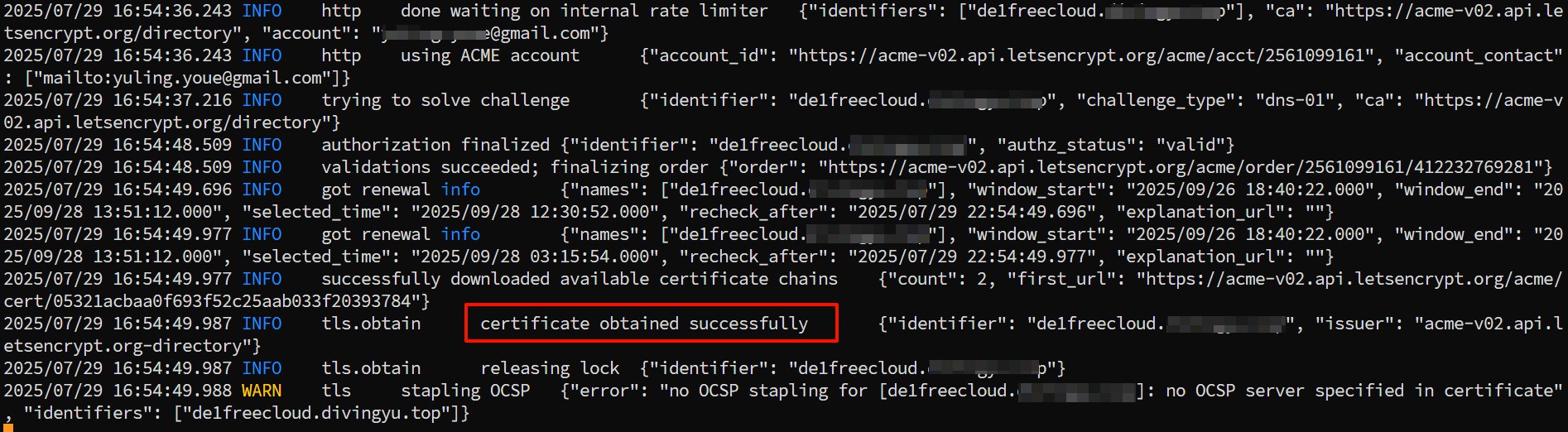
    • cloudflare为例, 通过DNS申请域名证书, 按上述下载的caddy可执行文件没有任何模块,需要通过xcaddy工具手动编译安装(通过caddy list-modules | grep cloudflare检查是否有cloudflare模块)

      1
      2
      3
      4
      ###下载xcaddy
      wget https://github.com/caddyserver/xcaddy/releases/download/v0.4.4/xcaddy_0.4.4_linux_amd64.tar.gz
      ###构建携带cloudflare模块的caddy
      ./xcaddy build --with github.com/caddy-dns/cloudflare
    • 按上述操作可能会提示没有找到go,需要安装go环境

      1
      2
      3
      4
      wget https://go.dev/dl/go1.24.5.linux-amd64.tar.gz
      rm -rf /usr/local/go && tar -C /usr/local -xzf go1.24.5.linux-amd64.tar.gz
      export PATH=$PATH:/usr/local/go/bin
      go version
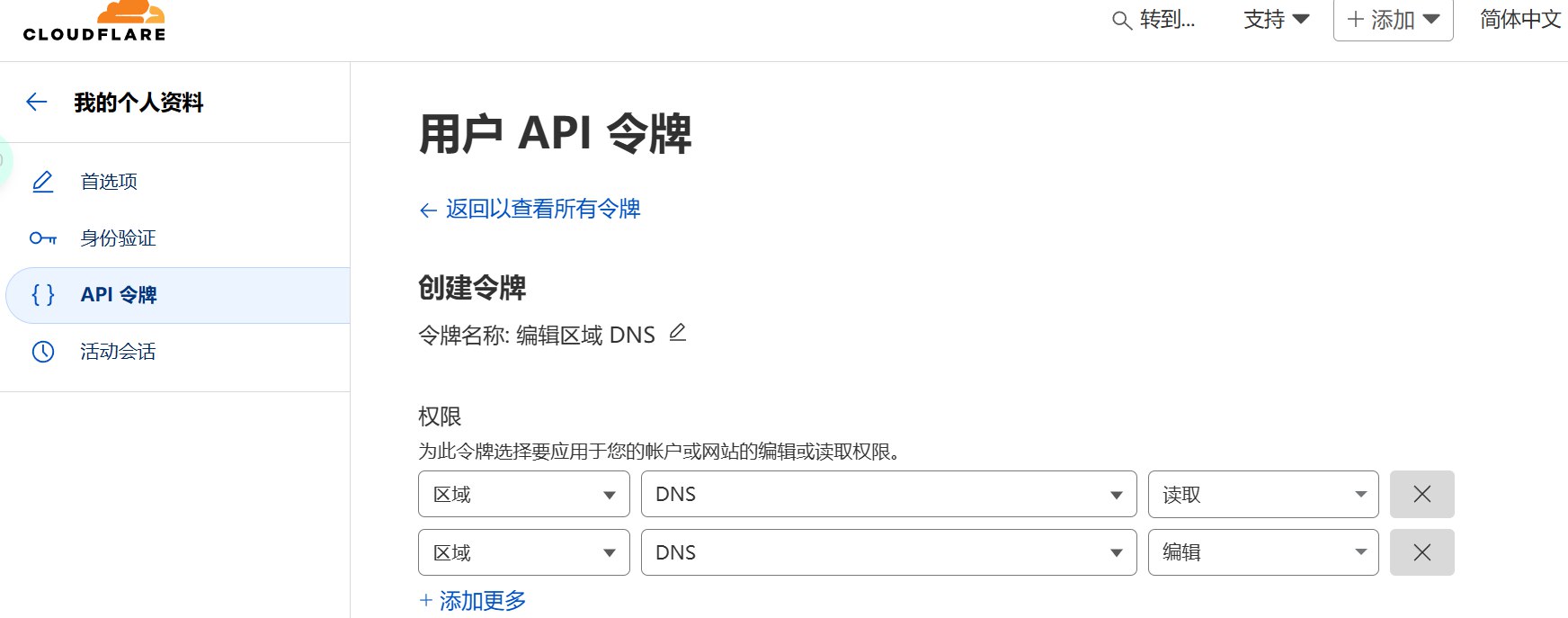
    • 创建Cloudflare API Token, 登录Cloudflare 仪表盘 -> My Profile -> API Tokens, 创建一个新的API Token, 选择编辑区域DNS模板,创建区域DNS读区域DNS编辑权限就可以了.

      cloudflare api token

  3. caddy.json配置文件参考

    1
    2
    3
    4
    5
    6
    7
    8
    9
    10
    11
    12
    13
    14
    15
    16
    17
    18
    19
    20
    21
    22
    23
    24
    25
    26
    27
    28
    29
    30
    31
    32
    33
    34
    35
    36
    37
    38
    39
    40
    41
    42
    43
    44
    45
    46
    47
    48
    49
    50
    51
    52
    53
    54
    55
    56
    57
    58
    59
    60
    61
    62
    63
    64
    65
    66
    67
    68
    69
    70
    71
    72
    73
    74
    75
    76
    77
    78
    79
    80
    81
    82
    83
    84
    85
    86
    87
    88
    89
    90
    91
    92
    93
    94
    95
    96
    97
    98
    99
    100
    101
    102
    103
    104
    105
    106
    107
    108
    109
    110
    111
    112
    113
    114
    115
    116
    117
    118
    119
    120
    121
    122
    123
    124
    125
    126
    127
    128
    129
    130
    131
    132
    133
    134
    135
    136
    137
    138
    139
    140
    141
    142
    143
    144
    145
    146
    147
    148
    149
    150
    151
    152
    153
    154
    155
    156
    157
    158
    159
    160
    161
    162
    163
    164
    165
    166
    167
    168
    169
    170
    171
    172
    173
    174
    {
    "apps": {
    "http": {
    "http_port": 18002,//如果是通过HTTP申请证书, 这里需要变回80
    "https_port": 18003,//reality需要访问的端口
    "servers": {
    "srvh1": {// 用于http重定向到https, 没有80端口可以删掉结构体
    "listen": [
    ":80"
    ],
    "routes": [
    {
    "handle": [
    {
    "handler": "static_response",
    "headers": {
    "Location": [
    "https://{http.request.host}{http.request.uri}"
    ]
    },
    "status_code": 301
    }
    ]
    }
    ],
    "protocols": [
    "h1"
    ]
    },
    "srvh2c": {
    "listen": [
    "127.0.0.1:18003"//和https_port保持一致
    ],
    "listener_wrappers": [
    {
    "wrapper": "proxy_protocol"
    },
    {
    "wrapper": "tls"
    }
    ],
    "routes": [
    {
    "handle": [
    {
    "handler": "headers",
    "response": {
    "set": {
    "Strict-Transport-Security": [
    "max-age=31536000; includeSubDomains; preload"
    ]
    }
    }
    },
    {
    "handler": "reverse_proxy",
    "transport": {
    "protocol": "http",
    "tls": {}
    },
    "upstreams": [
    {
    "dial": "speed.cloudflare.com:443"//伪装域名网站
    }
    ],
    "headers": {
    "request": {
    "set": {
    "Host": [
    "{http.reverse_proxy.upstream.hostport}"
    ]
    }
    }
    }
    }
    ]
    }
    ],
    "tls_connection_policies": [
    {
    "match": {
    "sni": [
    "xxxxxx.dpdns.org"//申请证书的域名
    ]
    },
    "protocol_min": "1.3",
    "protocol_max": "1.3",
    "cipher_suites": [
    "TLS_ECDHE_ECDSA_WITH_AES_256_GCM_SHA384",
    "TLS_ECDHE_ECDSA_WITH_AES_128_GCM_SHA256",
    "TLS_ECDHE_ECDSA_WITH_CHACHA20_POLY1305_SHA256"
    ],
    "curves": [
    "x25519",
    "secp521r1",
    "secp384r1",
    "secp256r1"
    ]
    }
    ],
    "protocols": [
    "h1",
    "h2"
    ]
    }
    }
    },
    //通过其他方式获取到证书, 选择直接加载证书文件
    //"tls": {
    // "certificates": {
    // "load_files": [
    // {
    // "certificate": "/root/caddy/cert.crt",
    // "key": "/root/caddy/private.key"
    // }
    // ]
    // }
    //}
    //--------------------------------------------------------
    //通过HTTP(需要放开80端口)获取证书
    // "tls": {
    // "certificates": {
    // "automate": [
    // "xxxxxxx.dpdns.org"//需要申请证书的域名
    // ]
    // },
    // "automation": {
    // "policies": [
    // {
    // "issuers": [
    // {
    // "module": "acme",
    // "email": "xxxxxx@gmail.com"
    // }
    // ]
    // }
    // ]
    // }
    //}
    //---------------------------------------------------------
    //通过证书服务商的DNS绕开80端口,直接申请, 需要api token
    "tls": {
    "certificates": {
    "automate": [
    "xxxxxx.dpdns.org"//申请证书的域名
    ]
    },
    "automation": {
    "policies": [
    {
    "issuers": [
    {
    "module": "acme",
    "email": "xxxxxxx@gmail.com",
    "challenges": {
    "dns": {
    "provider": {//根据自己情况选择
    "name": "cloudflare",
    "api_token": "xxxxx"
    }
    },
    "http": {
    "disabled": true
    },
    "tls-alpn": {
    "disabled": true
    }
    }
    }
    ]
    }
    ]
    }
    }
  4. 启动caddy

    1
    2
    3
    4
    ./caddy run --config caddy.json
    ./caddy stop --config caddy.json
    放进后台
    ./caddy start --config caddy.json

    启动caddy

  5. reality xray配置参考,sing-box类似

    1
    2
    3
    4
    5
    6
    7
    8
    9
    10
    11
    12
    13
    14
    15
    16
    "streamSettings": {
    "network": "tcp",
    "security": "reality",
    "realitySettings": {
    "show": false,
    "target": "127.0.0.1:18003",//这里填本地伪装域名的端口
    "xver": 0,
    "serverNames": [
    "xxxxxx.dpdns.org"//自己申请的证书
    ],
    "privateKey": "xxxxxxxxxxxxfeFI",
    "shortIds": [
    "2xxxxxf"
    ]
    }
    }
二、偷邻居(不需要有自己的域名)

  • Reality域名获取规则

    • 国内可以访问并且提供国外的IP或者CDN地址(最好不要用CDN地址,用CDN地址会让你的节点成为别人反向代理的加速节点)

    • 出现TLS1.3、X25519代表支持TLS1.3

      tls1.3

    • 找到 网络/network->all 然后找到当前访问域名的请求协议,如果是h2,则支持h2

      h2协议

    • 检查网站是否使用Cloudflare CDN, 如果在使用, 最好就不要用这个域名.

      检查方式: 网站的链接末尾添加/cdn-cgi/trace. 例如: 你找到网站www.executive-condo.sg符合上诉要求, 此时在后面加上/cdn-cgi/trace, 即:https://www.executive-condo.sg/cdn-cgi/trace, 如果网站提示404, 则表示每套CDN, 可以正常使用, 如果出现json格式的数据内容, 则表明套了CDN, 就不要使用.
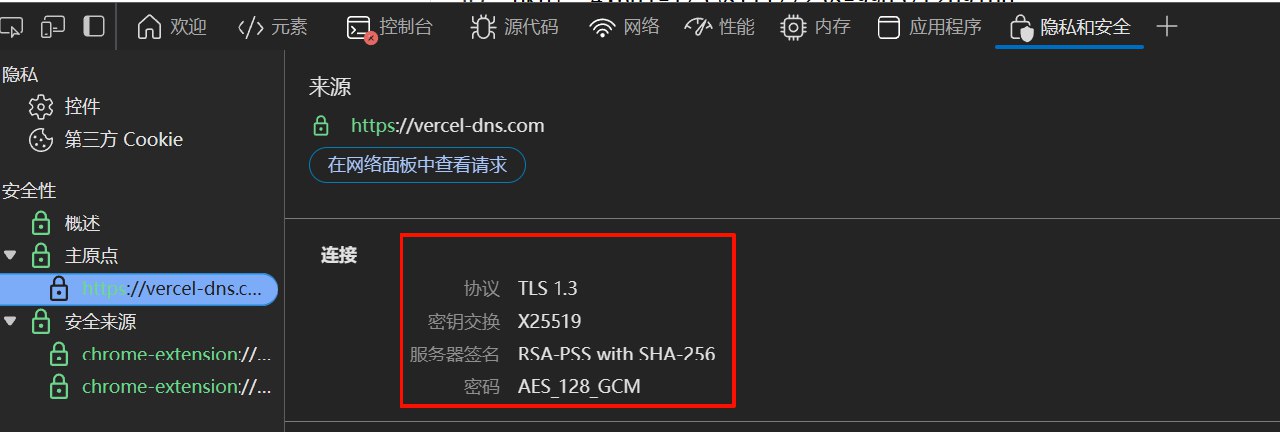
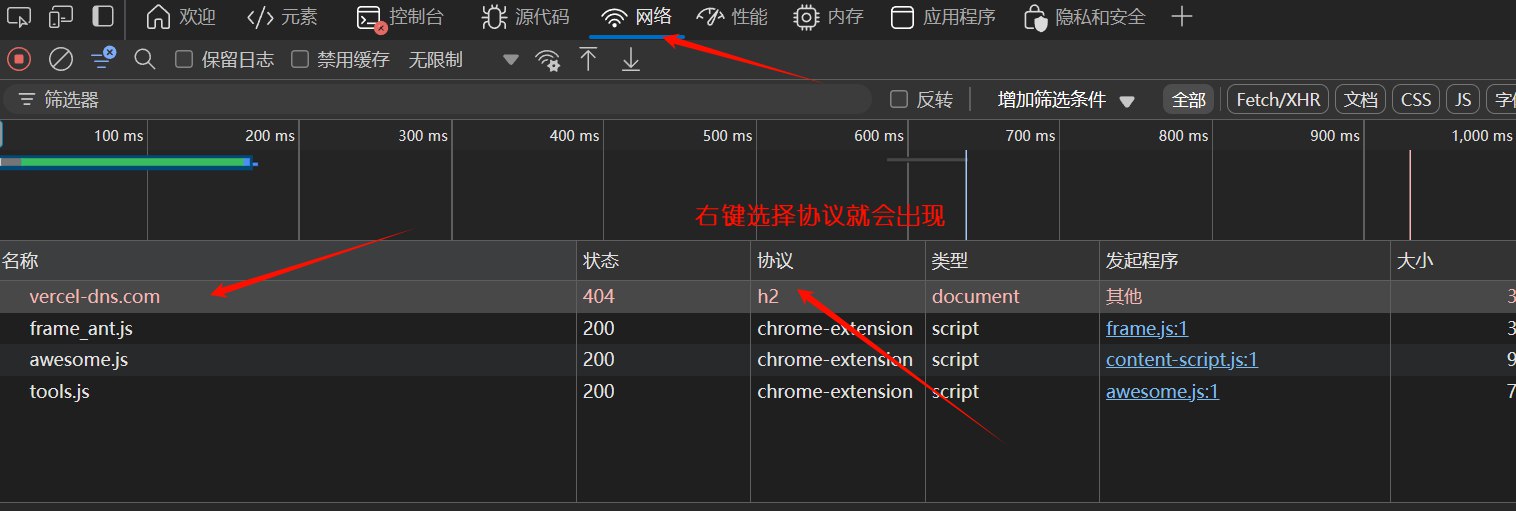
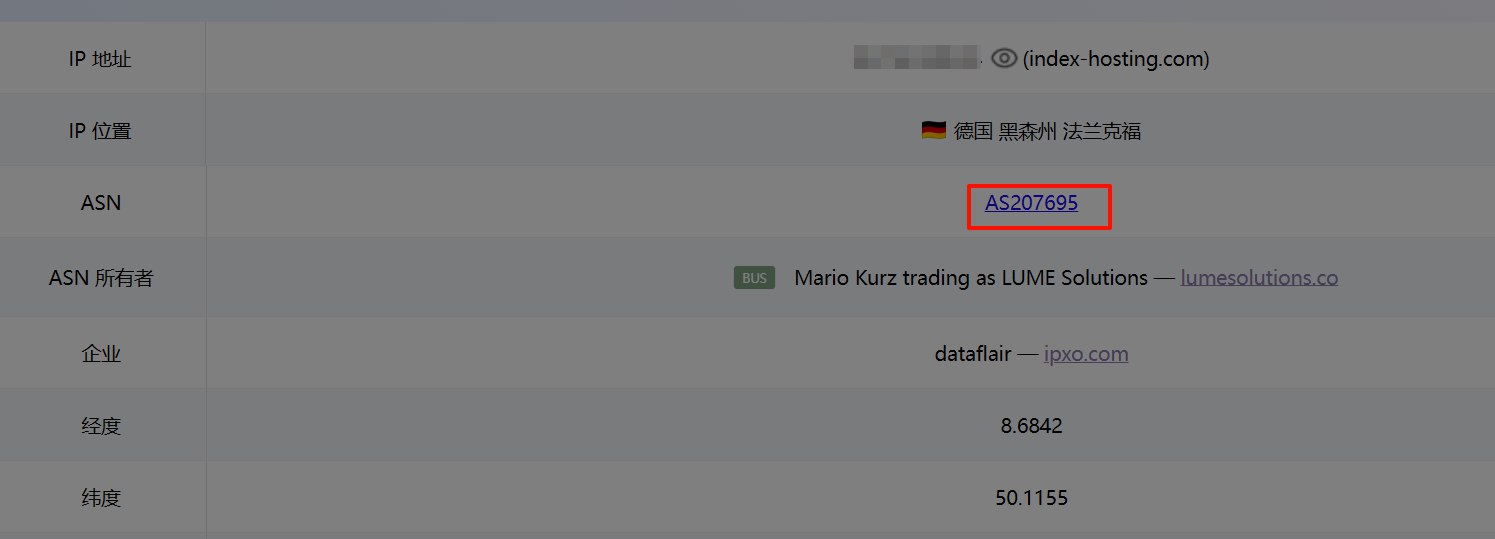
  1. 获取服务器ip, 通过ping0.cc可以得到ASN

    1
    2
    curl -s4m5 icanhazip.com -k //获取ipv4(如果有)
    curl -4 ip.p3terx.com
    1
    2
    curl -s6m5 icanhazip.com -k //获取ipv6
    curl -6 ip.p3terx.com
    1
    https://ping0.cc/ip/获取的ip

    获取ASN

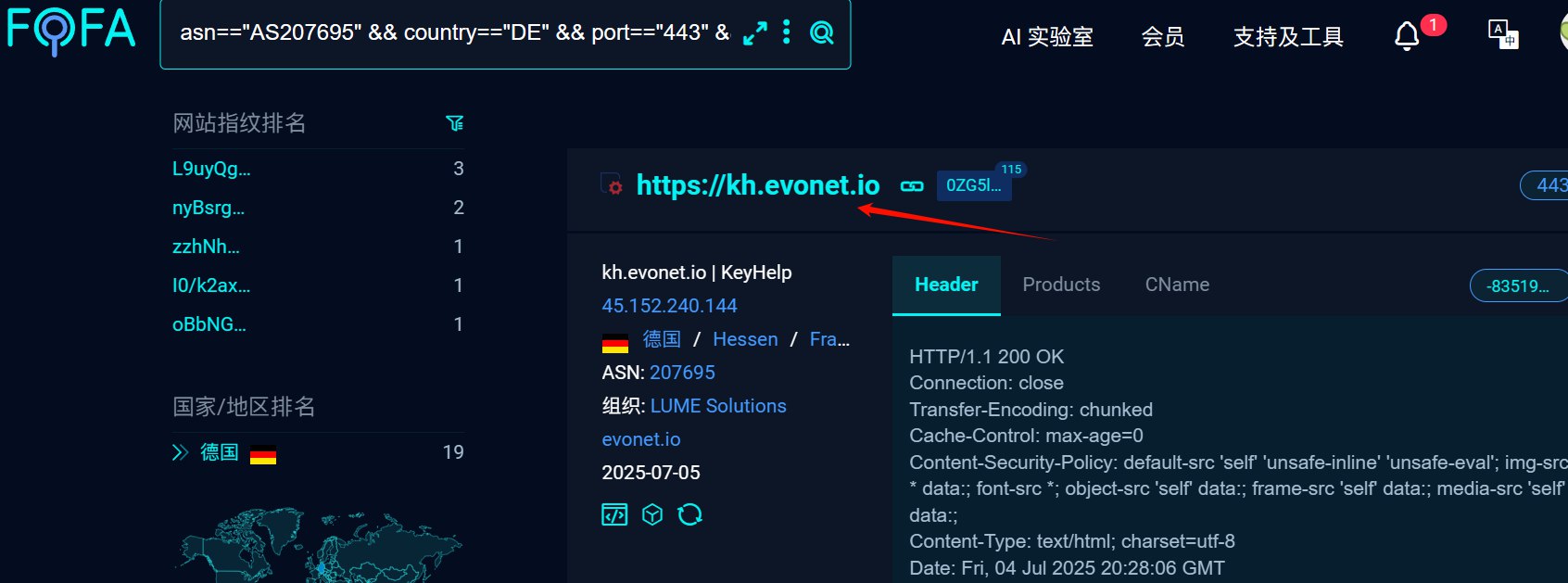
  2. 通过FOFA获取到符合reality规则的网站, asn为获取的ASN, 国家换成VPS的国家

    1
    asn=="AS207695" && country=="DE" && port=="443" && cert!="Let's Encrypt" && cert.issuer!="ZeroSSL" && status_code="200"

    点击搜索到的网站链接, 如果本地网络能够正常打开, 就可以使用
    FOFA德国reality网站

三、偷大厂域名

1
2
3
4
5
6
7
8
9
10
11
12
13
14
15
16
17
18
19
20
21
22
23
24
25
26
27
28
29
30
31
32
33
34
35
36
37
38
39
40
41
42
43
44
45
46
47
48
49
# Apple
gateway.icloud.com
itunes.apple.com
swdist.apple.com
mensura.cdn-apple.com
aod.itunes.apple.com,

# mozilla
download-installer.cdn.mozilla.net
addons.mozilla.org

# CDN
s0.awsstatic.com
d1.awsstatic.com
cdn-dynmedia-1.microsoft.com

# amazon
images-na.ssl-images-amazon.com
m.media-amazon.com

# google
dl.google.com
www.google-analytics.com

# 其他
one-piece.com
lol.secure.dyn.riotcdn.net
www.lovelive-anime.jp
www.swift.com
academy.nvidia.com
www.cisco.com
www.samsung.com
www.amd.com

# 技术网站
www.python.org
vuejs-jp.org
vuejs.org
zh-hk.vuejs.org
react.dev
www.java.com
www.oracle.com
www.mysql.com
www.mongodb.com
redis.io

# dns
cname.vercel-dns.com
vercel-dns.com

完成上述操作, reality节点搭建就完成了, 可以通过命令./xray run config.json运行内核测试连接

客户端配置

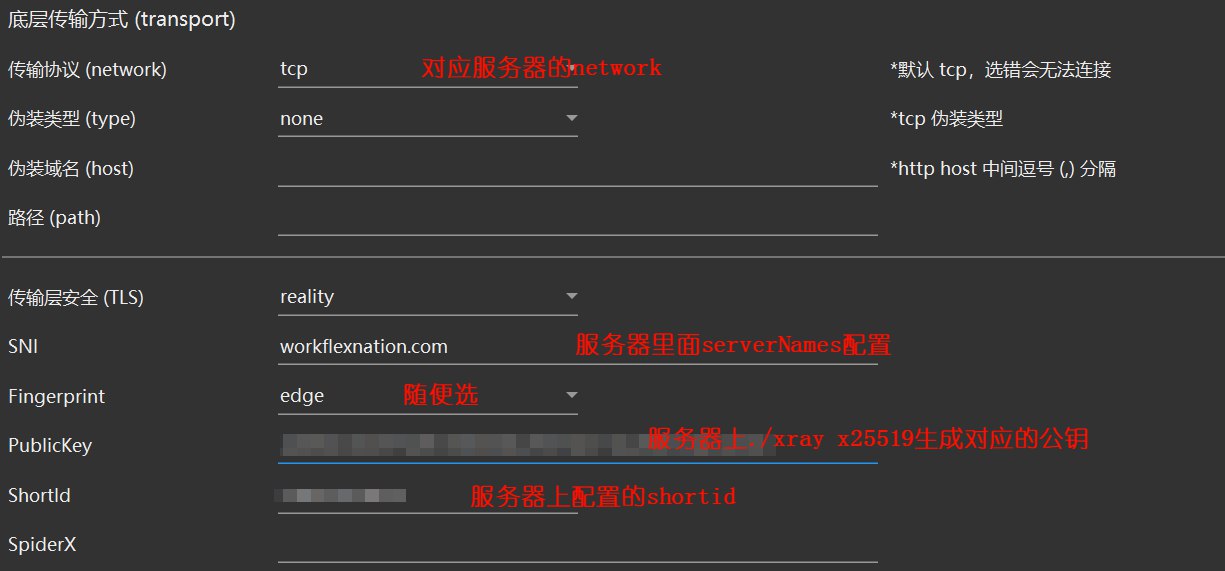
v2rayN 配置:
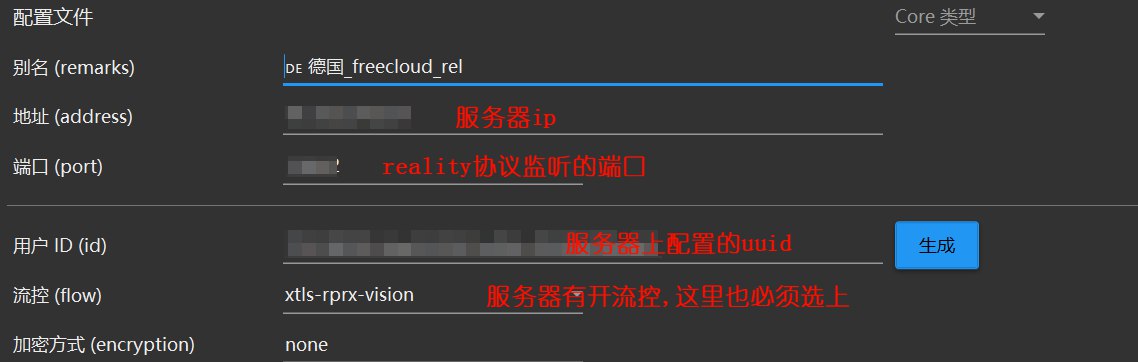
v2rayN_reality_config1

v2rayN_reality_config2

Clash配置:

1
- {name: DE_real, server: vps ip, port: 监听端口, reality-opts: {public-key: 服务器./xray x25519生成的公钥, short-id: 服务器上配置的shortid}, client-fingerprint: chrome, type: vless, uuid: 服务器配置的uuid, tls: true, tfo: false, flow: xtls-rprx-vision, servername: 服务器上配置的serverNames, skip-cert-verify: true, udp: true}

xray-core 在Alpine Linux下开机自启动

  1. 进入init.d目录下创建一个xray文件

    1
    2
    cd /etc/init.d
    vi xray
  2. 文件内容如下,根据自己环境修改:

    1
    2
    3
    4
    5
    6
    7
    8
    9
    10
    11
    12
    13
    14
    #!/sbin/openrc-run

    name="xray"

    command="/root/xray/xray"
    command_args="run -config /root/xray/config.json"

    pidfile="/var/run/.xraypid"

    command_background="yes"

    depend() {
    need networking
    }
  3. 启动xray

    1
    2
    3
    service xray restart    //启动xray服务
    service xray status //查看服务状态
    service xray stop //停止服务
  4. xray服务添加开机自启动

    检查 xray 服务的当前状态和启动级别配置,此时xray服务应该在manual运行级别

    1
    2
    rc-status
    rc-update show

    添加服务到默认运行级别

    1
    rc-update add xray default

    此时xray就能开机自启动了.